|
Menu Path from Main Menu |
S – F1 |
|
Overview |
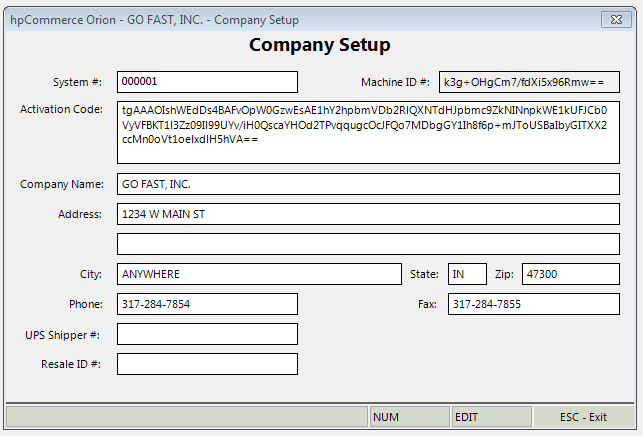
In Company Setup, Orion stores basic company information:
|
Caution! Do not change your System # or Company name.
If you need to change your Company Name, please contact hpCommerce Software Technical Support.
|
Field |
Description |
|
System # |
Unique number assigned by hpCommerce Software |
|
Machine ID # |
Unique number generated by the computer being used |
|
Activation Code |
Unique code assigned by hpCommerce Software and required to run Orion |
|
Company Name |
Your company name as it appears on invoices, sales orders, etc. |
|
Address |
Your address as it appears on invoices, sales orders, etc. |
|
City |
Your city as it appears on invoices, sales orders, etc. |
|
State |
Your state as it appears on invoices, sales orders, etc. |
|
Zip |
Your postal code as it appears on invoices, sales orders, etc. |
|
Phone |
Your phone number as it appears on invoices, sales orders, etc. |
|
Fax |
Your fax number as it appears on invoices, sales orders, etc. |
|
UPS Shipper # |
Your UPS shipper number |
|
Resale ID # |
Your resale ID |